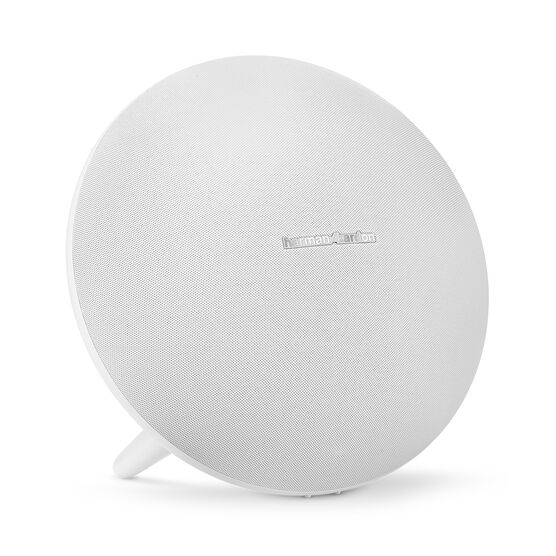


Harman Kardon Onyx Studio 4
Details https://www.harmankardon.com.sg/ONYX+STUDIO+4.html?dwvar_ONYX%20STUDIO%204_color=White-APAC-CurrentPortable Bluetooth Speaker
Portable Bluetooth Speaker


Wireless Bluetooth Streaming
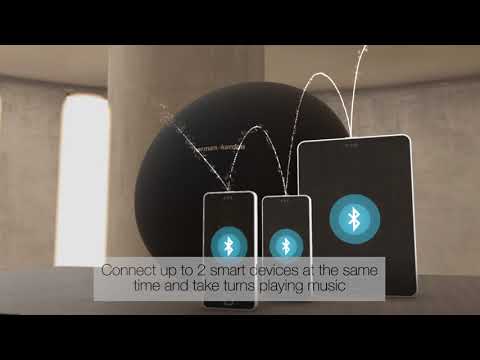
Stream music wirelessly via Bluetooth to enjoy room-filling sound. Connect up to 2 smart devices at the same time and take turns playing music.

Up to 8 hours of playtime
The rechargeable battery supports up to 8 hours of playtime

HK Connect+
Amplify your listening experience by wirelessly connecting more than 100 HK Connect+ enabled speakers.

Built-in Microphone Conferencing System
Noise and echo cancellation enables crystal-clear conferencing.
Voice Integration
Access Siri or Google Now from the speaker with a simple button press. This can be easily configured via the HK Connect App.
Premium Materials
The superior fabric and finishing combines with iconic design to compliment any style.
Providing the perfect balance of great sound, iconic design, and premium materials, the Onyx Studio 4 is the epitome of room-filling audio. Crafted to be the best sounding, full featured, portable Bluetooth speaker in its class, the Onyx Studio 4 offers two device connections, up to 8 hours of playtime and Harman Kardon Connect+, which allows you to connect 100+ speakers with the same feature with the touch of a button. Rounding out the Onyx Studio 4 offerings is a built-in microphone with Voicelogic, echo and noise cancellation for crystal-clear conferencing over the speaker.
General Specifications
Dimensions
Control and Connection Specifications
Battery
Spec Sheet (English)
English 709 KB- 1 x Harman Kardon Onyx Studio 4
- 1 x Power adaptor
- 1 x Quick start guide
- 1 x Warranty card
- 1 x Safety sheet

The latest owner's manuals, quick start guides, and documents.
Onyx Series
\nNote: This action will erase all settings and Bluetooth data from the device. You will be required to pair and connect to your devices again after this action is done.
\n\n
Onyx
\n- Turn the speaker ON
- Press and hold the Bluetooth & Power button for more than 3 seconds
- The speaker will power off and be factory reset
\n
Onyx Mini, Onyx Studio 2, Onyx Studio 3, Onyx Studio 4
\n- Turn the speaker ON
- Press and hold the Volume (+) & Phone button for more than 3 seconds
- The speaker will power off and be factory reset
\n
Onyx Studio
\n- Turn the speaker ON
- Press and hold the Volume (-) & Bluetooth button for more than 3 seconds
- The speaker will power off and be factory reset
\n
Onyx Studio 5, Onyx Studio 6, Onyx Studio 7, Onyx Studio 8, Onyx Studio 9
\n- Turn the speaker ON
- Press and hold the Volume (+) & Bluetooth button for more than 5 seconds
- The speaker will power off and be factory reset
","Answer__c":"
Onyx Series
\nNote: This action will erase all settings and Bluetooth data from the device. You will be required to pair and connect to your devices again after this action is done.
\n\n
Onyx
\n- Turn the speaker ON
- Press and hold the Bluetooth & Power button for more than 3 seconds
- The speaker will power off and be factory reset
\n
Onyx Mini, Onyx Studio 2, Onyx Studio 3, Onyx Studio 4
\n- Turn the speaker ON
- Press and hold the Volume (+) & Phone button for more than 3 seconds
- The speaker will power off and be factory reset
\n
Onyx Studio
\n- Turn the speaker ON
- Press and hold the Volume (-) & Bluetooth button for more than 3 seconds
- The speaker will power off and be factory reset
\n
Onyx Studio 5, Onyx Studio 6, Onyx Studio 7, Onyx Studio 8, Onyx Studio 9
\n- Turn the speaker ON
- Press and hold the Volume (+) & Bluetooth button for more than 5 seconds
- The speaker will power off and be factory reset
","ArticleType":"How_Tos__kav"},{"attributes":{"type":"Knowledge__kav","url":"/services/data/v45.0/sobjects/Knowledge__kav/ka25d000000Xj6EAAS"},"Title":"How do I power on and pair the Onyx Studio 4?","Id":"ka25d000000Xj6EAAS","ArticleNumber":"000034350","Question__c":"How do I power on and pair the Onyx Studio 4?","Process__c":"Make sure that the unit you are attempting to connect to is in pairing mode under Bluetooth Settings. Press the power button located on far right outer rim of the speaker. If this is the first time connecting the unit, it will immediately go into pairing mode. HK Onyx 4 Studio should show up on your discoverable devices within 3-5 seconds. Once you choose the HK Onyx Studio 4 on your device, you will be connected and ready to experience that superior Harman Kardon sound.","Answer__c":"Make sure that the unit you are attempting to connect to is in pairing mode under Bluetooth Settings. Press the power button located on far right outer rim of the speaker. If this is the first time connecting the unit, it will immediately go into pairing mode. HK Onyx 4 Studio should show up on your discoverable devices within 3-5 seconds. Once you choose the HK Onyx Studio 4 on your device, you will be connected and ready to experience that superior Harman Kardon sound.","ArticleType":"How_Tos__kav"},{"attributes":{"type":"Knowledge__kav","url":"/services/data/v45.0/sobjects/Knowledge__kav/ka25d000000Xj5tAAC"},"Title":"How do I use the HK Connect feature on the Onyx Studio 4?","Id":"ka25d000000Xj5tAAC","ArticleNumber":"000034505","Question__c":"How do I use the HK Connect feature on the Onyx Studio 4?","Process__c":"Download the HK Connect app to your mobile device. Make sure that the Onyx Studio 4 speaker is connected successfully to your mobile device. The HK Connect app should recognize the Onyx Studio 4 within the first few seconds. Once inside the app you can activate the voice assistant and connect to other Connect+ Harman Kardon devices.","Answer__c":"Download the HK Connect app to your mobile device. Make sure that the Onyx Studio 4 speaker is connected successfully to your mobile device. The HK Connect app should recognize the Onyx Studio 4 within the first few seconds. Once inside the app you can activate the voice assistant and connect to other Connect+ Harman Kardon devices.","ArticleType":"How_Tos__kav"},{"attributes":{"type":"Knowledge__kav","url":"/services/data/v45.0/sobjects/Knowledge__kav/ka25d000000Xj7GAAS"},"Title":"What is connect+?","Id":"ka25d000000Xj7GAAS","ArticleNumber":"000031470","Question__c":"What is connect+?","Process__c":"JBL Connect+ can wirelessly link more than 100 JBL Connect+ enabled speakers together to amplify the party","Answer__c":"JBL Connect+ can wirelessly link more than 100 JBL Connect+ enabled speakers together to amplify the party","ArticleType":"How_Tos__kav"}]}


